Palm Springs Hospitality Association · Built at the PS/NExT Vibe-a-thon
One trusted source for every major valley event.
The Coachella Valley Events Hub is a self-maintaining events platform for the desert's
hospitality community — a public calendar that verifies itself, a private planning layer for association
members, and AI studios that turn events into marketing. This is the complete guide: the story, every
feature, and how to run it.
0sources aggregated nightly (and growing — by pasting a URL)
0live events, deduplicated & AI-classified
24/7self-maintaining — aggregation, verification, expiry, all automatic
0minutes per week of human attention
01
The story: a calendar problem worth solving
The Palm Springs Hospitality Association represents ~77 hotels, resorts, restaurants,
venues, and vendors across the Coachella Valley. Their members' businesses move with the event calendar —
Coachella weekend fills every room from Palm Springs to Indio; a quiet September week is when you schedule
the renovation. And yet…
The problem, as PSHA brought it to the Vibe-a-thon
Events scattered across a dozen city, tourism, venue, and casino calendars. Listings that went stale
because every shared calendar depends on a human who eventually stops updating it. No way to tell
confirmed from rumored. And member properties planning their own galas and buyouts had no view of each
other's plans — so big nights collided.
The constraint that shaped everything
No budget. No staff time. Whatever got built had to run itself — aggregate itself,
verify itself, expire its own stale listings — and hand humans only the judgment calls, each one click big.
What the Vibe-a-thon build became
A three-audience platform: a public calendar anyone can trust, a private member layer for
deconfliction and planning, and an admin experience so automated it takes ~15 minutes a week —
plus AI planning assistants and content studios for members and admins.
02
One platform, three experiences
Everyone uses the same calendar. What you can do with it depends on who you are — signed
out, signed in as a member, or signed in as an admin. The interface reveals more as your access grows.
The public
Plan around the valley
Browse every confirmed and tentative event in list, month, and map views. Filter by date, city,
category, impact. Subscribe once and updates flow into your own calendar forever. Submit an event with
nothing but an email — or a photo of the flyer.
PSHA members
See around corners
Everything public, plus the private member layer: share your property's plans with fellow members —
or post just a "hold" on your dates — get conflict warnings, sync your existing calendar automatically,
ask the Planning Concierge anything, and generate on-brand marketing in the Creative Studio.
PSHA admins
Run it in minutes
Approve, confirm, and edit right on the calendar itself. Onboard new source calendars by pasting a
URL. Render finished promo videos. Tune every policy without code — or skip the panel entirely and run
it all by talking to Claude.
03
The public calendar: aggregated, classified, alive
Once a day, automatically, the Hub pulls 12+ public sources — tourism bureaus, the convention
center, the arena, three casino groups, museums, fairgrounds — deduplicates across them, and lets AI assign
each event a category, audience tags, and a visitor-impact level: the staffing signal that
tells a hotelier whether a weekend fills rooms valley-wide.
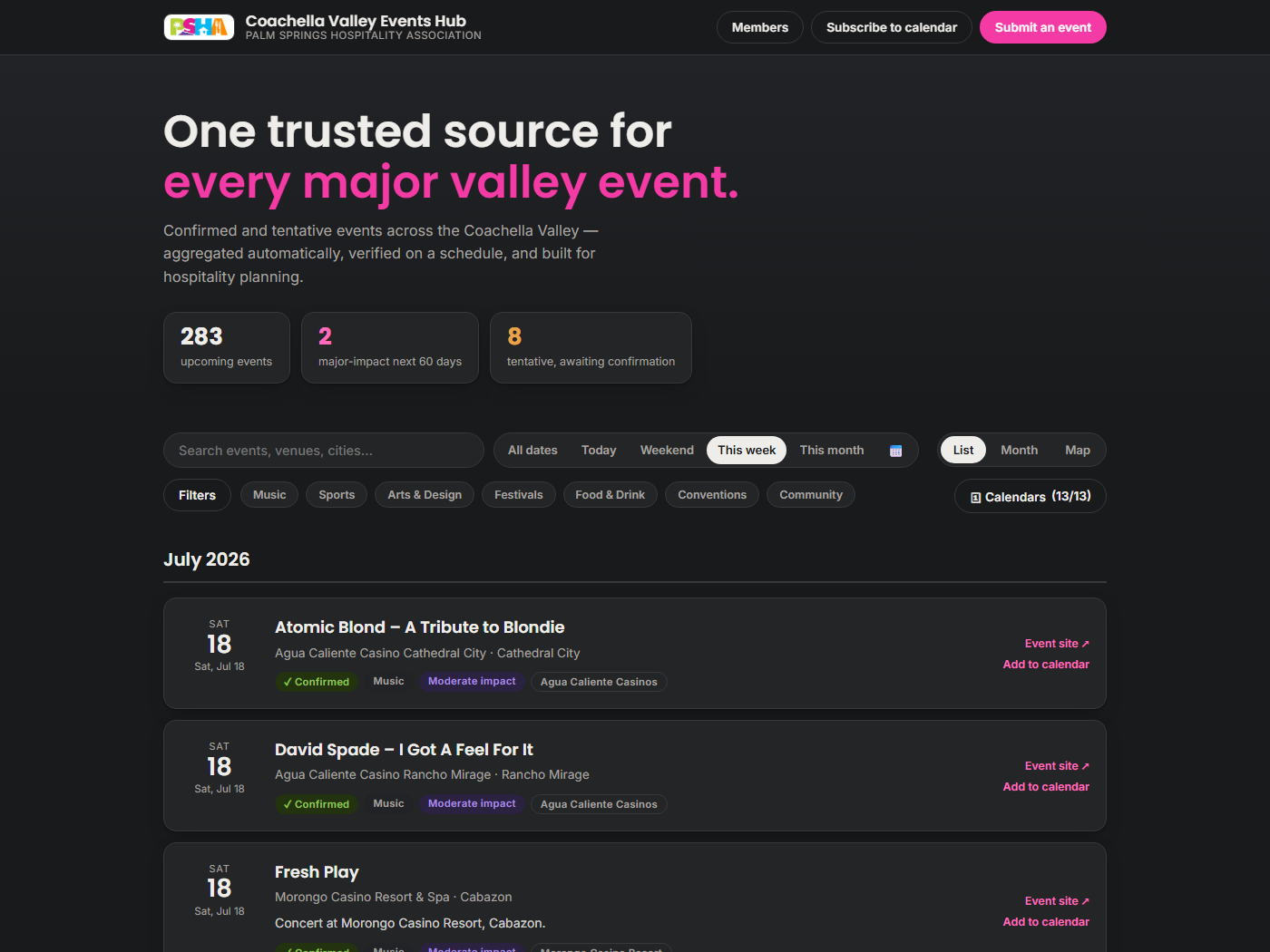
List view with quick date pills, filters, source trust picker — defaults to “This week.”
🗓 Three views
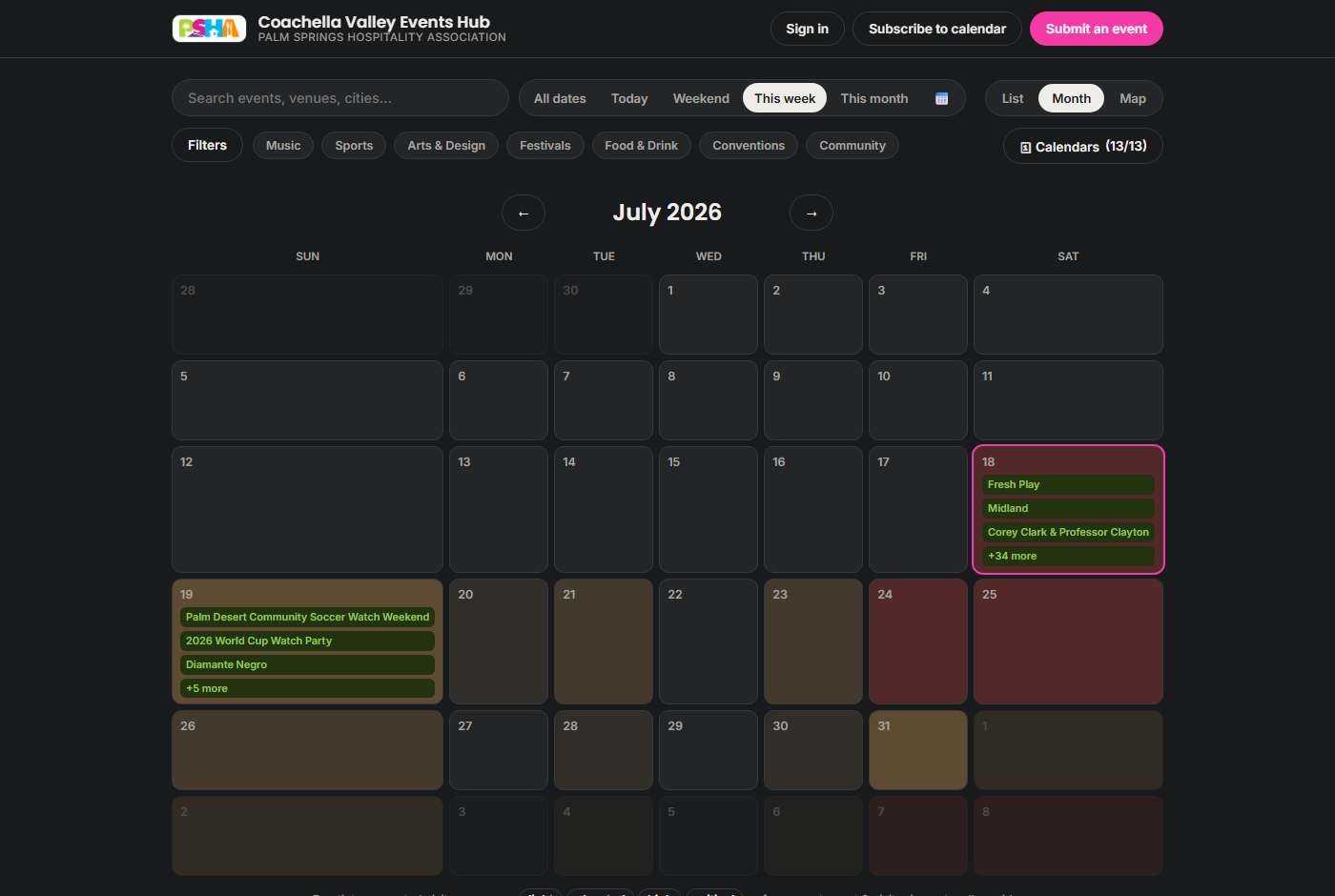
List cards, a month grid whose days tint light→critical as a
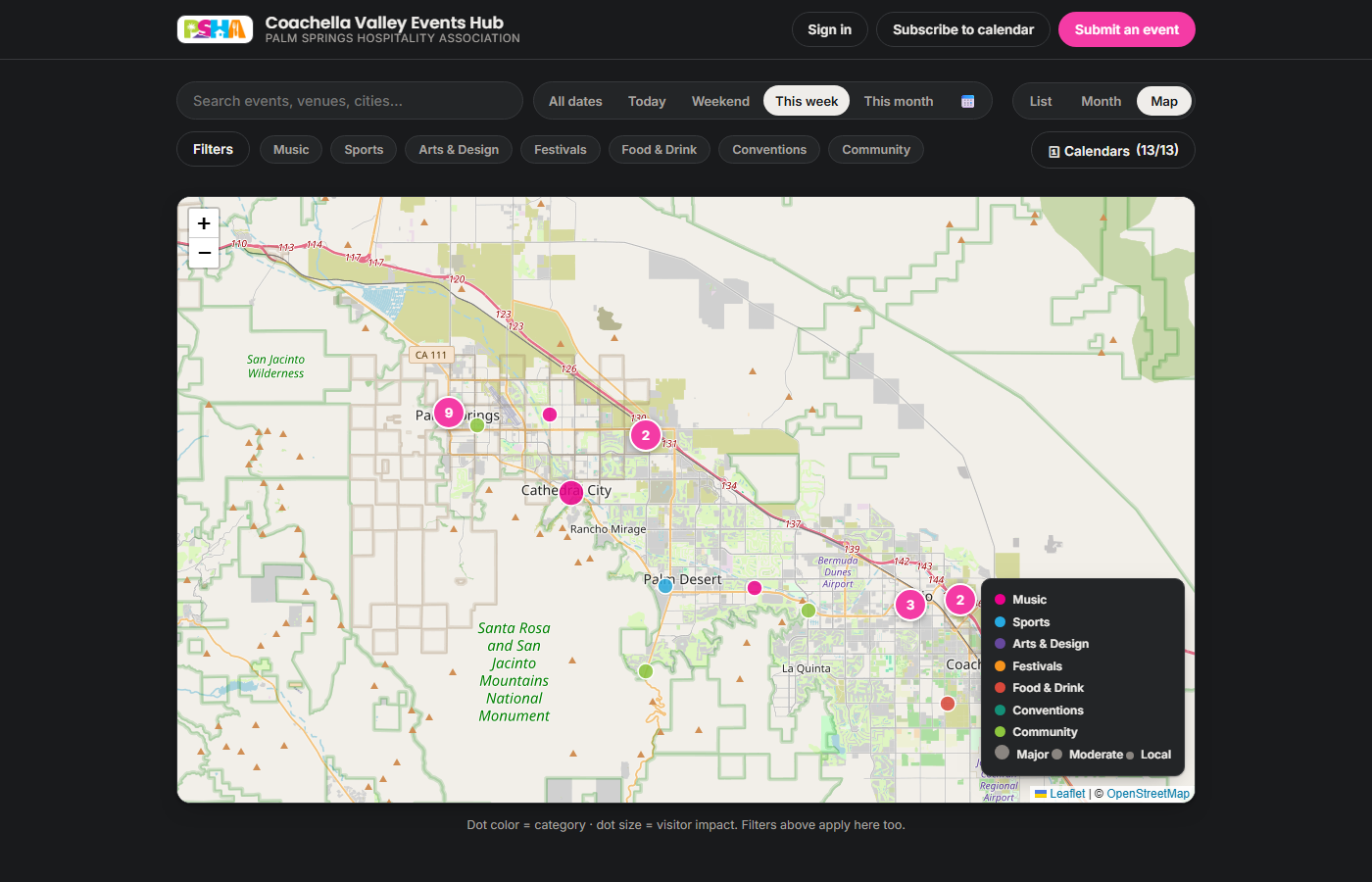
demand-pressure heatmap, and a map with dots colored by category and sized by impact.
🔌 Sources that add themselves
An admin pastes any events-page URL; the AI
probes it, writes a persistent extraction recipe, test-runs it, and activates it only if real events
come out. Coverage grows with zero engineering.
📅 The shared calendar
Hit Subscribe to calendar once and
the Hub becomes a live feed inside your own Google, Outlook, or Apple Calendar — every new event,
confirmation, and expiry flows in automatically, forever. Choose the full feed or major-events-only.
📬 The Monday list
Every Monday morning, subscribers get the week-starter
email: major visitor-driving events in the next 60 days, so staffing and inventory decisions happen
before the week does. Sign up in the site footer; unsubscribe is one click.
📱 Everywhere else
Install the Hub on any phone like a native app, or
embed the live widget on any website with one line of code — filtered to a city or impact level if you like.
🖼 Official artwork Experimental
PSHA admins
can switch on event card artwork: each event's own official image becomes its card
background. Every image is contrast-measured and gets an adaptive scrim so the text always stays
readable — and generic venue stock never masquerades as event art.
Month view: each future day tinted by demand pressure — compression weekends and quiet
promo nights at a glance.Map view: the whole valley — dots colored by category, sized by visitor impact, clustered
where events pile up.
This is the live widget — real data, right now:
Any website gets this with one
<iframe> line — every embed on a member hotel's site markets the association.
04
Why it stays trustworthy: the loop that closes itself
Every calendar dies the same death: stale listings. Here, staleness is structurally
impossible — three independent mechanisms converge on every tentative event.
Deadline on every tentative event
Unconfirmed events wear a visible
confirm-by date. Everyone can see what's solid and what isn't.
One-click organizer links
Reminder emails carry signed Confirm / Need-30-more-days /
Withdraw links. No account, no login, no friction.
Nightly AI verification
An agent re-checks tentative events against their official
websites via web search and attaches evidence to the admin digest.
Automatic expiry
Anything still unconfirmed past its deadline archives itself.
The machine enforces freshness; no one's diligence required.
“Nothing appears publicly without review, and nothing stale can survive — the two promises
that make operators actually rely on it.”
05
The member layer: deconfliction without disclosure
Members sign in with just their work email — passwordless, and gated by the association's
member roster. Security is designed in rather than bolted on: every request is verified server-side, member
data lives in a private store the public site can never serve, and other properties' confidential entries
never even reach your browser.
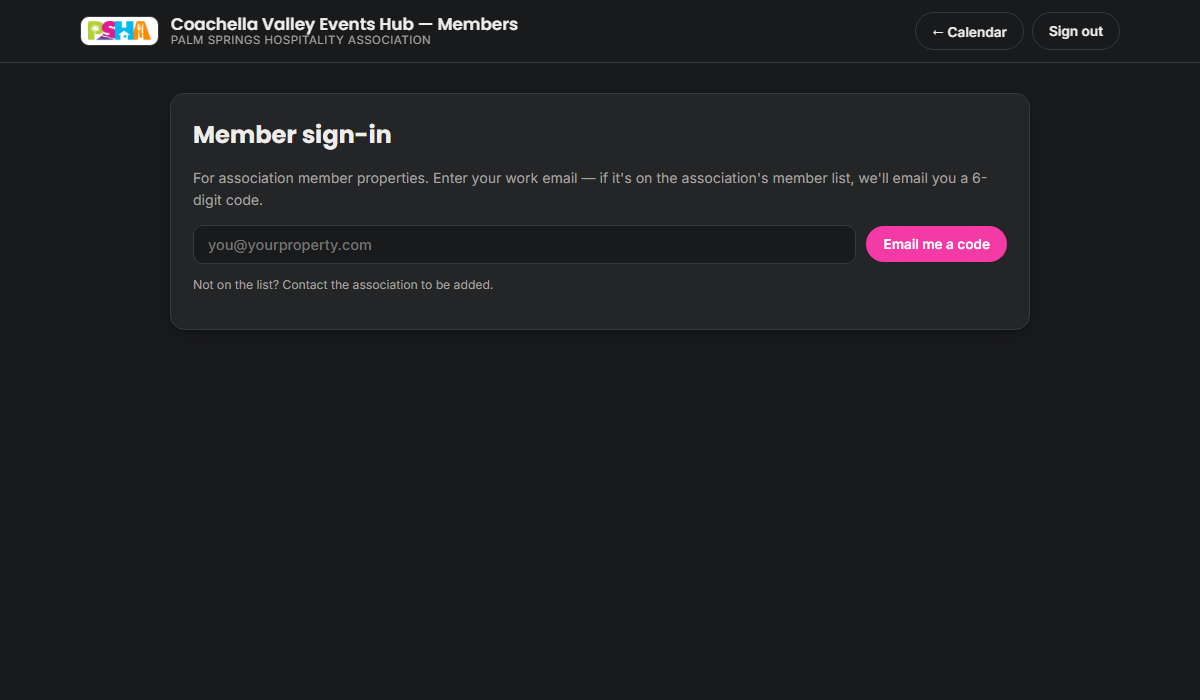
Roster-gated email sign-in — if you're on the association's list, you're in.
Private — only your property sees it. Your own planning
scratchpad, with all the tools (conflict warnings, Concierge, Studio) working on it.
Full details for members — fellow association properties see
everything: venue, headcount, notes. The default for “we want everyone planning around this.”
Hold — members see only your property name and the dates.
“We're taken that weekend” without revealing the confidential buyout. Deconfliction without disclosure.
Live conflict warnings the moment you pick dates another property has plans on — informational, never blocking.
Zero-effort entry: AI imports any CSV/Excel (any columns, any date formats, dedup included), or paste an iCal feed once and it syncs nightly.
Conflict alerts: when the nightly aggregation lands a new major event on your dates, your team gets one heads-up email. (Only after you've been invited — membership is staging, invitation is consent.)
Post-event outcomes: log whether an event actually drove business. Over a season this becomes a private demand dataset nobody else in the valley has.
One-click → Public: request a public listing; the association reviews before anything appears.
06
Administration: the calendar is the control room
There's no separate "database screen" to learn. A signed-in admin sees the same
calendar as everyone else — plus pending events, and approve / confirm / +30d / edit / archive right on
every card, month day, and map dot. Actions apply instantly.
📥 Needs attention
The whole weekly routine: pending submissions (invisible
until approved) and tentative events by deadline, each one click to resolve. Fifteen minutes, most weeks.
🗓 Calendars
Paste any events URL → the AI builds and test-runs a scraper in
~2 minutes. One-click enable/disable on any source flows through the site, feeds, and digest.
👥 Members & invites
Roster with per-person admin grants (email sign-in,
instant revocation), and two fully editable invite emails — a member welcome and an admin onboarding —
with per-person invited-on tracking.
🤖 AI settings
Switch the member chatbot on/off, edit its starter questions,
append association guidance to its instructions, and pick which Google models power chat, images, and
video — with a live “refresh latest models” lookup.
⚖️ Policies
Governance without code: submission intake modes, deadlines,
reminder cadence, expiry grace — plus an on/off switch for every advanced feature on this page.
🧾 A free audit trail
Every change — human, pipeline, or AI — is a version-
controlled commit. The history of the calendar is the audit log.
07
The AI layer: concierges and studios
Four AI capabilities, all grounded in the Hub's real data — never generic chatbot fluff.
Members + admins
🌴 Planning Concierge
A chat colleague that knows the full calendar, the member layer you're allowed to see, the PSHA
directory with contacts, and the live web. It rates dates FAVORABLE → CRITICAL,
recommends member businesses first, and drafts RFPs from your property's side of the table.
The admin version also sees the queue, knows how the whole app works, and can drive the panel.
Members
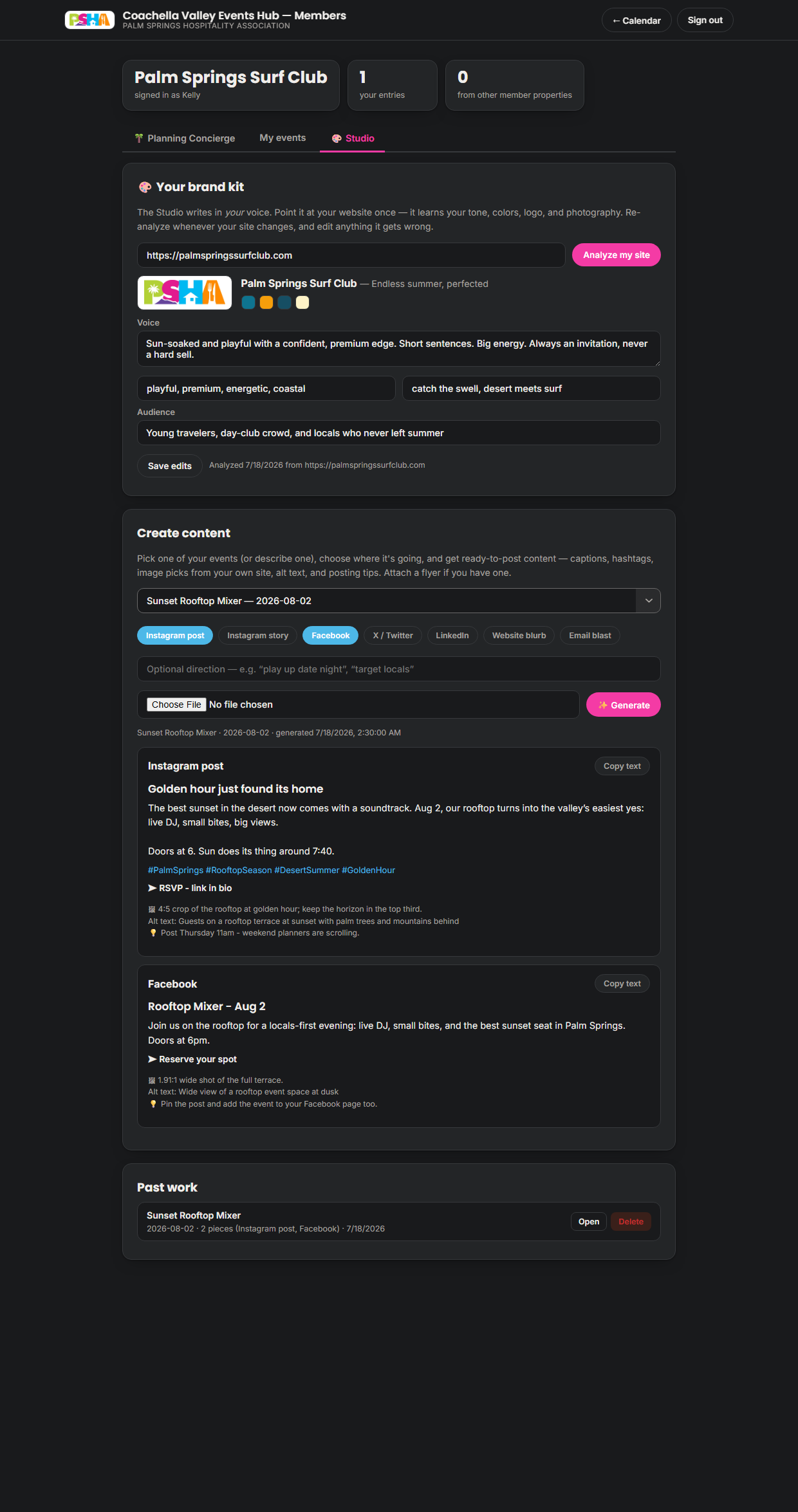
🎨 Creative Studio
Point it at your own website once — it learns your voice, tone, colors, logo, and photography into a
brand kit you can edit. Then any event becomes ready-to-post content per platform: Instagram post &
story, Facebook, X, LinkedIn, web blurb, email blast — with image picks from your own site,
crop notes, alt text, and posting tips. Every generation saved to revisit.
The Creative Studio, live: a brand kit learned from the property's own website, ready-to-post
content per platform with crop notes and posting tips, and saved past work to revisit.
AdminsExperimental
🎬 Video Studio
That clip was rendered entirely by the platform — pick
events, write one line of creative direction, choose Reels / square / landscape, click once.
Scrapes real photos and video from each event's website — your uploaded asset library wins over everything, AI art fills any gaps
Pick just 1–3 events and it becomes a hype trailer: a multi-scene story arc per event, with web-researched facts (who's playing the final?), real venue photography found via web search, and themed generated scenes driven by your instructions
AI storyboard, cinematic generated intro, continuous instrumental soundtrack
Cards show headline + date · venue · city; closes on the PSHA logo and palmspringshospitality.org
Live duration guidance per platform; the panel babysits the ~5-minute render and the finished clip just appears
08
Built into your membership
One more benefit of PSHA membership: alongside everything else the association does for its
members, the Hub adds a working toolset.
The problem you know
“We booked our gala the same night as a festival.”
Never blindsided again. One trusted calendar of everything public and what
fellow members have planned; live conflict warnings the moment you pick dates; an automatic heads-up
email if a big event later lands on yours.
The problem you know
“We staff and stock by gut feeling.”
Schedule to the demand curve. Every event carries a visitor-impact rating, the month
view is a pressure heatmap, and the Monday list lands before the week does — compression weekends and
quiet promo nights become obvious.
The problem you know
“Social content takes hours we don't have.”
An on-call content team, in your voice. The Creative Studio learns your brand from
your own website and writes ready-to-post content per platform; the association can even render finished
promo videos featuring your events.
The problem you know
“Research eats my week.”
Ask, don't dig. The Planning Concierge knows the whole calendar, the member
directory with contacts, and the live web — conflict-checks a date, names who to call, and drafts your
RFP response in one conversation.
The problem you know
“Our events already live in three other systems.”
Bring them over in one move. Batch-upload from any spreadsheet or export — any
columns, any date formats, duplicates caught automatically — or connect the calendar you already keep
(Google, Outlook, your booking system) once and the Hub stays in sync nightly, hands-free.
The bottom line
What this quietly replaces
A market-intel subscription, a social-content service, and hours of calendar detective work every
month — included with membership, no extra cost to your property, live the day the association invites
you in.
09
Run the whole thing by talking to Claude
The platform is also a Claude connector (MCP). Add one URL in Claude
Cowork, claude.ai, or Claude Code, and every admin operation — 24 tools — becomes conversational.
You: What's in the approval queue?
Claude: Two pending: “Sunset Rooftop Mixer” (Aug 2) and a member request for “Harvest Dinner” (Oct 10). Want details, or shall I approve either?
You: Approve the mixer as tentative, then make a Reels video of this weekend's biggest events — energetic, lead with the concerts.
Claude: Done — mixer is live as tentative with its Sept 2 deadline. The video is rendering (~5 min); I'll give you the shareable link when it lands. 🎬
Events, approvals, sources, roster, invites, admin grants, policies, AI settings, video rendering — all speakable
Guardrails: confirmation before destructive actions, confidential member data flagged, model changes validated
Every AI action lands in the audit history as its own labeled change
The connector URL is the admin credential — shared privately, rotatable in seconds
10
The playbook: real scenarios, start to finish
What using the Hub actually feels like — five true-to-life walkthroughs, then the tricks
people don't expect until they see them.
Scenario · restaurant
“It's Thursday, and Saturday looks slow”
A GM asks the Concierge: “If I wanted to create an event this Saturday to draw business to my
restaurant, what do you recommend?” It scans the calendar, spots the gap — three shows letting out
with no obvious “where next” — and proposes a late-night after-show angle with ready-to-post copy.
Say yes, and it creates the event; ask for a TikTok ad, and the Video Studio renders one. Idea to posted
promo: about twenty minutes.
Scenario · hotel
Planning a 300-person gala
Ask the Concierge for a conflict-free spring date — it rates candidates FAVORABLE→CRITICAL against
every public event and member hold. Post a hold on the winner so fellow members plan
around you (without knowing why). Closer in, flip the hold to full details, then click
→ Public when tickets open. One entry evolves through the whole lifecycle.
Scenario · admin Monday
The 15-minute week
Coffee, digest email (with the AI's overnight verification evidence), open Needs attention: approve
two, extend one, reject a duplicate. Done. Or skip the panel entirely — in Cowork:
“Work through my queue with me” — and approve by replying “yes, yes, no.”
Scenario · new source
A venue launches its season
Someone forwards a link to a theater's new events page. Admin pastes the URL in Calendars → Analyze
& add. Two minutes later the AI has built and test-run a scraper, and that venue is part of the
nightly aggregation forever. No developer was involved.
Scenario · big weekend
Marketing a monster weekend
Upload the official key art to the asset library with a one-line description, tick it, select the
weekend's eight events, write “energetic, lead with the concerts” — and collect a scored,
branded Reel plus a landscape cut for YouTube while you make coffee. Post everywhere.
Scenario · win business
An RFP lands in your inbox
Tell the Concierge: “Help me win an RFP for a 3-day January retreat at my property.” It
checks January pressure (mind The American Express week), drafts your response positioning, and flags
exactly what to verify before you send. It knows you're the seller — it argues your side.
💡 Tips & tricks people don't expect
Ask for the quiet, not the busy
“Quietest week in September for a
full-property buyout?” The heatmap thinks in pressure — so renovations, deep cleans, and staff
parties land on the right week.
Photograph the poster
The public submit form reads a flyer photo and fills
itself in. The Video Studio accepts flyers too — a bar napkin sketch of an event can become a finished
ad in one sitting.
Teach the Concierge house rules
Admins: drop a line in the AI tab like
“City of Palm Springs special-event permits need 60 days — remind members to file early.”
From then on, every member conversation quietly carries that advice.
Let it navigate for you
The admin Concierge drives the panel:
“take me to policies,”“open the video studio,”“search the calendar for jazz.”
Faster than remembering where things live.
Ask “who do I call?”
The Concierge holds the PSHA directory with public
contacts: “Who's the point of contact at ARRIVE Palm Springs?” beats digging through old emails.
Sync once, never type again
Members: paste your Google/Outlook calendar's
iCal link once. Your member-layer entries then maintain themselves nightly — adds, updates, removals.
Re-teach the Studio after a rebrand
Redesigned your website? Hit “Analyze my
site” again and the brand kit — voice, colors, photography — refreshes to match. Your next posts follow.
Log how it went
Thirty seconds after an event — 📈 big lift or ↘ slow —
builds a private demand dataset that makes every future date recommendation sharper.
Precision-restrict the video art
In Cowork: “Make the clip using only
the new key art.” Claude lists your assets, picks the ids, and the render uses exactly those —
nothing scraped, nothing generated.
Put the calendar on your site
One iframe line embeds the live widget on any
member hotel's page — filtered to your city if you like. Free marketing that updates itself.
Install it like an app
On your phone, “Add to Home Screen” — the Hub opens
full-screen like a native app, and the front desk always has this week's answer.
Deconflict before you dream
Type tentative dates into the member form and
pause — the live conflict check shows who else has plans before you've committed to anything.
11
Questions people actually ask
Does submitting an event require an account?
No. An email address is the only requirement (it's where confirmation reminders go). You can even just
photograph the flyer and let the AI fill in the form. Nothing appears publicly until the association approves it.
Can other members see my property's private plans?
Only what you choose. “Private” entries never leave your property's view — enforcement happens on the
server, so other members' browsers never even receive the data. “Holds” share only your property name and dates.
What keeps the calendar from going stale like every other one?
Tentative events expire automatically at their deadline unless someone — the organizer via a one-click
email link, the nightly AI verifier with evidence, or the admin — confirms them. Freshness is enforced by the machine.
Who can become an admin?
Any roster email the association grants it to — one click on the Members tab, revocable instantly. Admins
use the same passwordless email sign-in as members, so there are no shared passwords to leak (a sealed
break-glass credential exists for emergencies only).
Will members get spammed?
No. Being added to the roster sends nothing. Members receive email only after an admin explicitly sends
their invitation — and sign-in messages only when the member themselves asks to sign in.
How do I get this calendar into Google, Outlook, or Apple Calendar?
Click Subscribe to calendar in the site header and choose your calendar app. It's a live
feed, not a copy — every future addition, confirmation, and expiry appears in your calendar automatically.
Prefer signal over volume? Subscribe to the major-events-only feed in the footer instead.
What's the Monday email, and how do I get it (or stop it)?
A once-a-week digest of major visitor-driving events in the next 60 days — the week-starter for staffing
and inventory decisions. Sign up with your email in the site footer; every issue carries a one-click
unsubscribe link.
What does “tentative” actually mean?
Announced but not yet verified — shown with an amber badge and a visible confirm-by date. It becomes
confirmed when the organizer clicks their email link, the nightly AI finds official confirmation, or the
association confirms it; otherwise it expires on its deadline and quietly leaves the calendar.
How is “visitor impact” decided?
Layered: each source has sensible defaults, keyword rules adjust, the AI applies a rubric (major = fills
hotels valley-wide; moderate = regional draw; local = community event), and a human's judgment always
overrides everything. It's the staffing signal, so it's deliberately conservative.
Does the member portal cost my property anything?
No. It's an association member benefit — the entire platform runs for a few dollars a month, absorbed by
PSHA. There are no per-seat fees, and nothing in the portal ever asks for payment.
I submitted an event — can I change or withdraw it?
Yes. The reminder emails you receive carry one-click links to confirm, extend, or withdraw the listing —
no account needed. For content edits, reply to any of those emails or contact the association; admins can
edit every detail in seconds.
What happens if a source website changes or breaks?
That source fails softly — the nightly run continues with the rest, and the source shows as unavailable in
the admin panel until it recovers or is replaced. One broken feed never takes down the calendar.
Where this came from: the Vibe-a-thon, and a flywheel for the valley
The Hub wasn't commissioned from a vendor. It's a result of the PS/NExT Summit
Vibe-a-thon — Palm Springs Convention Center, June 22–23, 2026 — where local businesses brought real
problems and local builders prototyped working AI solutions. Pitched at the Summit, this platform was
built in a day a few weeks later as part of the Vibe-a-thon follow-up.
PS/NExT — New Experiences in Technology — was co-envisioned by
Peter Loforte and is presented by the City of Palm Springs Office of Economic
Development and the Palm Springs Chamber of Commerce, with one mission: develop
skills, solve challenges, spark innovation, and expand economic opportunity across the region. The
Vibe-a-thon — which Loforte also co-envisioned, led by ex-OpenAI engineer Philip Su and
sponsored by Visit Greater Palm Springs (the agency formed in 1989 to grow the valley's
tourism economy) — is that mission made concrete: a dozen-plus local organizations pitched the tools they'd
never had the resources to build — some teams writing no code at all, just describing what they needed in
plain English — and a day later, six of them demoed working software to the businesses it was built for.
Several went into production within weeks. This platform came out of that same pipeline: submitted by the
hospitality association, then built in a day in the Vibe-a-thon's follow-up round a few weeks after the
Summit.
The Vibe-a-thon is part of a bigger idea: a
flywheel of economic growth for the Coachella Valley. Local businesses bring the problems. Builders,
students, and entrepreneurs grow their skills solving them. Educators and mentors keep that knowledge here.
Every shipped prototype makes it easier for the next business to step forward and the next student to step
in — and the Vibe-a-thon is the spark.
Local
businesses, builders & workforce, and educators — feeding each other in a loop.
The flywheel · 1
Local businesses
Bring the real challenges — repetitive workflows, customer questions, scheduling, reporting,
translation, anything that slows the team down. Problems they couldn't unblock alone become the raw
material of the loop.
The flywheel · 2
Builders & workforce
Teams of students, builders, designers, and entrepreneurs use the latest AI tools to prototype
working solutions — first-time prototypers getting real-world reps they can't get anywhere else,
alongside experienced developers willing to mentor.
The flywheel · 3
Educators & mentors
Colleges, instructors, and seasoned advisors guide the teams, develop local talent, and pass that
knowledge back into the community — so the valley keeps both ends of the exchange instead of
outsourcing them.
This Hub is one turn of that wheel: a real association
need, built in a day — roughly 10,600 lines of working code spanning the
site, the member portal, the serverless backend, the AI pipeline, and the video render farm. Built conventionally,
this is realistically a few months of work for a small development team — a six-figure
project at typical contractor rates. Now heading into production, it's built to maintain itself — the
nightly pipeline aggregates, verifies, and prunes on its own, for a few dollars a month — and every feature
added since that first day was built the same way it started: by describing what was needed and letting AI
do the heavy lifting. That's the experiment the Vibe-a-thon set out to run, and you're reading its result.
Special thanks to the Vibe-a-thon's sponsor,
Visit Greater Palm Springs, and CEO Scott White, for making all of this
possible — and to Kelly Garcia of the Palm Springs Hospitality Association for making the
Vibe-a-thon submission and helping bring the Hub to life.
 Events Hub · The Guide