# Coachella Valley Events Hub — User Manual
*Palm Springs Hospitality Association · July 2026*
| Where | URL |
|---|---|
| Public calendar | https://peterlof.github.io/PS-Hospitality-Association/ |
| **Interactive guide** | …/guide.html — the story, features, playbook, and FAQ as a designed web experience |
| Submit an event | …/submit.html |
| Member portal | …/members.html |
| Admin panel | …/admin.html |
| Embeddable widget | …/widget.html |
| Technical runbook | [OPERATIONS.md](../OPERATIONS.md) · Developer docs: [README.md](../README.md) |
---
## 1 · Executive summary
The Events Hub began as a **PS/NExT Vibe-a-thon** challenge from the Palm Springs Hospitality Association. The brief: Coachella Valley hospitality businesses — the hotels, resorts, restaurants, venues, and vendors that make up PSHA's ~77 members — live and die by the valley's event calendar, yet there was no single trusted source. Events were scattered across a dozen city, tourism, venue, and casino calendars; listings went stale; nobody knew what was confirmed versus rumored; and member properties planning their own galas, buyouts, and group business had no way to see one another's plans and avoid collisions. The association had essentially no budget and no staff time, so whatever got built had to run itself.
Every requirement in the original brief was met, and the platform grew well past it. What exists today:
- **A self-maintaining public calendar.** Every night the Hub aggregates 12+ public sources, deduplicates across them, classifies every event with AI (category, audience, visitor impact), and enforces a verification loop that closes itself: tentative events carry deadlines, organizers get one-click confirm/extend/withdraw email links, a nightly AI agent re-checks tentative events against their official websites, and anything unconfirmed auto-archives. **Stale listings are structurally impossible.** Adding a new source calendar is paste-a-URL — the AI builds and test-runs the scraper itself.
- **A private member layer.** Association properties sign in with an emailed code and share their event plans at three visibility levels — including bare "holds" that say *we're taken that weekend* without revealing why — with live conflict warnings, spreadsheet import, automatic iCal feed sync, and post-event outcome logging that quietly builds a private demand dataset.
- **AI working for members and admins.** A Planning Concierge chatbot grounded in the full calendar, the member layer, and the live web; a Creative Studio that learns each property's brand from its own website and writes ready-to-post social content; and a Video Studio that renders finished, scored, branded promo clips from selected events.
- **AI-native administration.** The entire platform is also a Claude connector (MCP) — the administrator can run every operation, including rendering videos, by talking to Claude in Cowork.
Scale of the build: ~9,000 lines of code across a static site, a serverless Worker, and a Python automation pipeline; ~290 live events from 17 sources at the time of writing. Running cost: **about $4–8/month** plus ~$1–2 per rendered video, and roughly **15 minutes a week** of human attention.
---
## 2 · Admin guide
The admin panel (`/admin.html`) is the association's command center. Everything an admin does becomes a git commit — the platform keeps a complete audit history automatically.
### 2.1 Signing in

**Sign in with your work email** — the same 6-digit-code flow as the member portal. Admin access is a per-person grant on the association's roster (see §2.8): if your roster entry has the admin flag, the code signs you into the full panel; one sign-in also covers the member portal and lights up the 🛡 Admin links across the site. If your email isn't flagged, you'll be told to ask an existing admin.
*Advanced — access token:* a collapsed "sign in with an access token instead" option remains as the break-glass backdoor. It works even if email delivery or the roster is unavailable; the token is issued by the platform owner and stays in your browser only.
Behind the scenes: email-authenticated admins act through the platform's server (which holds the repository credential), so no sensitive token ever reaches their browser — and revoking someone's admin flag cuts their access immediately.
### 2.2 The dashboard
Signing in lands on stat tiles — total events, **awaiting approval (not public)**, tentative, past-deadline, and active source calendars — followed by the tab strip:
**🌴 Concierge · Needs attention · Member events · Calendars · Members · Video · AI · Policies**
There is deliberately no "all events" tab: **the public calendar itself is your event manager** (see §2.6) — signed in as an admin, every card there grows management buttons.
### 2.3 🌴 Concierge (the default tab)
Your AI copilot. It knows everything the member concierge knows — the full public calendar, member events, the PSHA business directory with contacts, live web search — **plus** your approval queue, the roster, the governance policies, and how this platform itself works. Use it to:
- Answer planning questions: *"What's driving demand in March?"*, *"Find a conflict-free gala date."*
- Work the queue conversationally: *"What's waiting for approval?"*
- Learn the app: *"How does adding a calendar source work?"*, *"What can I switch off in Policies?"*
- Navigate: *"Take me to pending submissions"* — it can open tabs and searches for you (it can never approve, delete, or publish anything itself; those stay your clicks).
Every reply ends with tappable follow-up chips.
### 2.4 Needs attention — the weekly routine
This is the ~15-minutes-a-week job. Two groups, in order:
1. **Pending submissions** — public or member submissions, invisible to the public until you act. Buttons: **✓ Approve** (publish confirmed), **Approve as tentative** (publish with its confirmation deadline), **Reject**.
2. **Tentative events by soonest deadline** — Buttons: **✓ Confirm**, **+30d** (push the deadline), **Archive**.
Anything you leave alone resolves itself: organizers get automated reminder emails with one-click confirm/extend/withdraw links, the nightly AI verification attaches evidence to your digest, and unconfirmed events expire on schedule.
### 2.5 Member events
Oversight of the private member layer: every entry member properties have added, with property, dates, visibility level, and who created it. Expand **Details** for everything; **Remove** anything inappropriate. This data is never public.
### 2.6 Managing events — on the calendar itself
Open the regular calendar (index.html) while signed in as an admin and it becomes the full event manager — the *same* list, month, and map views, filters, heatmap, and search everyone else sees, plus:
- **Pending events are visible** (badged "🔒 Pending — not public"), with a **Pending** filter pill added to the status filters.
- **Every card, month-day entry, and map popup carries inline actions**: ✓ Approve / ≈ Tentative / ✕ Reject on pending events; ✓ Confirm / +30d on tentative ones; Archive on anything; and **✎ Edit**, which opens the full editor in the admin panel. Actions apply instantly — no refresh, no waiting.
- **+ Add event** lives on the panel's Needs attention tab (full editor: dates, times, venue, address, cost, category, impact, organizer, deadline).
Nothing about the public's view changes — these controls appear only for signed-in roster admins.
### 2.7 Calendars — sources that grow themselves
- **Add a calendar by URL**: paste any events page, name it, pick an authority tier, press **Analyze & add**. The AI probes the page (feeds, APIs, or page structure), writes a persistent extraction recipe, test-runs it (~2 minutes), and activates it *only if real events extract*. Sources it can't read are rejected, never saved broken.
- **Enable / Disable** any source with one click. Disabling hides its events from the public and member calendars, the ICS feeds, and the digest, and stops scraping — nothing is deleted, and re-enabling restores everything. "⚠ unavailable" sources are bot-blocked sites being monitored; you can retry-enable them.
### 2.8 Members — the roster
Who may sign in, and at what privilege. Add **email + name + property** (the property field autocompletes from PSHA's own published directory); remove to revoke access instantly. Stored on a private branch, never public. Per member:
- **✉ Invite / Re-invite** — sends the association's welcome email describing the platform and how to sign in. A checkbox sends it automatically when you add someone; the row button (re-)sends it anytime, and each row shows its status — *invited ‹date›* or *⏳ not invited*. **Uninvited members receive no email from the platform at all** (no conflict alerts, nothing) until you explicitly invite them; adding someone to the roster is staging, not consent. The message itself is **yours to edit** — expand *"Edit the invite message"* above the list (placeholders `{name}`, `{property}`, `{portalUrl}` fill in per member).
- **Make admin / Revoke admin** — grants or removes the full admin panel for that email. Admins sign in with the same email code as members (via the member portal's 🛡 Admin panel link); a 🛡 badge marks them on the roster, and revocation takes effect immediately.
- **🛡 Admin invite** — admins get their own onboarding email (what they can now do, how to get in), offered right when you grant admin and re-sendable from the row, with its own *invited-on* tracking. Like the member invite, **its text is fully editable** in the same "Edit the invite messages" panel.
### 2.9 Video — the Video Studio *(experimental)*
Renders ready-to-post social clips from your events, in three cards top to bottom:
1. **Asset library.** Upload your own photos and video clips (25 MB each) with a **description of what each is for** — e.g. *"Morongo pool deck b-roll — use for any Morongo event."* Assets are **strictly opt-in**: tick the ones eligible for the next render; unticked assets stay in the library but sit that video out. A ticked, matching asset is featured on that event's card **ahead of** anything scraped or AI-generated.
2. **Create a promo clip.** Pick a date window → *Load events* → tick up to 8 (major-impact pre-ticked; duplicates removed automatically). Write creative direction (*"upbeat locals-focused holiday roundup; lead with the concerts"*). Choose form factors — Reels/TikTok/Shorts (9:16), Feed square (1:1), YouTube/Facebook (16:9) — and watch the **live duration estimate** score your selection against each platform's sweet spot. Optional call-to-action, then **🎬 Create video**. The panel shows an animated status and needs nothing further from you.
*What happens behind the scenes (~3–8 min):* real photos and video are scraped from each event's website (each image/video used at most once per clip); AI art fills any gaps; Gemini writes the storyboard; **Veo** generates a cinematic intro matched to the event's subject; **Lyria** composes a continuous instrumental soundtrack; ffmpeg assembles cards (headline + *date · venue · city*) and closes on the **PSHA logo with palmspringshospitality.org**.
**Feature mode (1–2 events).** Selecting one or two events turns the clip into a **hype trailer**: each event gets a 3–5 scene story arc (~25s) with distinct visuals per scene instead of a single card. Three events render as a **mini-feature** — two scenes per event. **Your instructions steer the visuals** — the studio runs a web-research pass to resolve facts the instructions depend on (*"look up which teams are in the final"* puts the matchup on screen) and generates themed scenes when the event's own site won't have matching imagery. It also web-searches each **venue's official website** and pulls real venue photography for scene backgrounds — genuine photos of the place are always preferred over AI lookalikes. Real logos, jerseys, and trademarks are never rendered — team and artist names appear as on-screen text.
3. **Rendered clips.** Finished videos appear here automatically (a "☁ Publishing…" placeholder covers the minute the site takes to serve a fresh file). Preview inline, **download** per format, **Delete** to remove the files and the record. Each render costs roughly **$1–2**.
### 2.10 AI — models and the member chatbot
- **Member chatbot**: switch the members' Planning Concierge on/off; edit its **starter questions** (one per line, up to 12); and write **additional instructions** that are appended to the concierge's prompt — association campaigns, permit lead-times, house rules, corrections.
- **Gemini models**: choose which Google models power the platform — chatbot text model (the list never offers anything older than `gemini-3.5-flash`), image-creation model, video-creation model. **↻ Refresh latest models** pulls Google's current catalog so you can adopt new models the day they ship.
### 2.11 Policies — governance without code
Plain-English controls, applied by the next pipeline run and new submissions:
- **Visibility**: do public submissions publish immediately or hold for review? What do member "→ Public" requests do? Default visibility for new member entries.
- **Verification loop**: default confirmation deadlines, reminder window and cadence, grace period before auto-archive.
- **Advanced features** — one switch each: one-click confirm links, AI auto-verification, demand heatmap, conflict alerts, flyer intake, member calendar sync, Creative Studio, Video Studio, and **Event card artwork** *(experimental, off by default)* — the pipeline fetches each event's official image and shows it as the card's background on the public calendar. Every image is contrast-measured and gets its own readability scrim (tuned separately for light and dark mode); images too busy to read text over are rejected, and art is cleaned up when events expire. Switching it on starts the backfill immediately.
- A live summary sentence explains exactly what your current settings do.
### 2.12 Email the admin receives
- **Monday digest** — major events in the next 60 days (also sent to public subscribers).
- **Tentative-events digest** — events approaching deadline with the AI verification verdicts and evidence links.
- **Actions alerts** — only if a nightly run fails (rare; the pipeline is fault-tolerant).
---
## 3 · Member guide
The member portal (`/members.html`) is for PSHA member properties on the roster.
### 3.1 Signing in
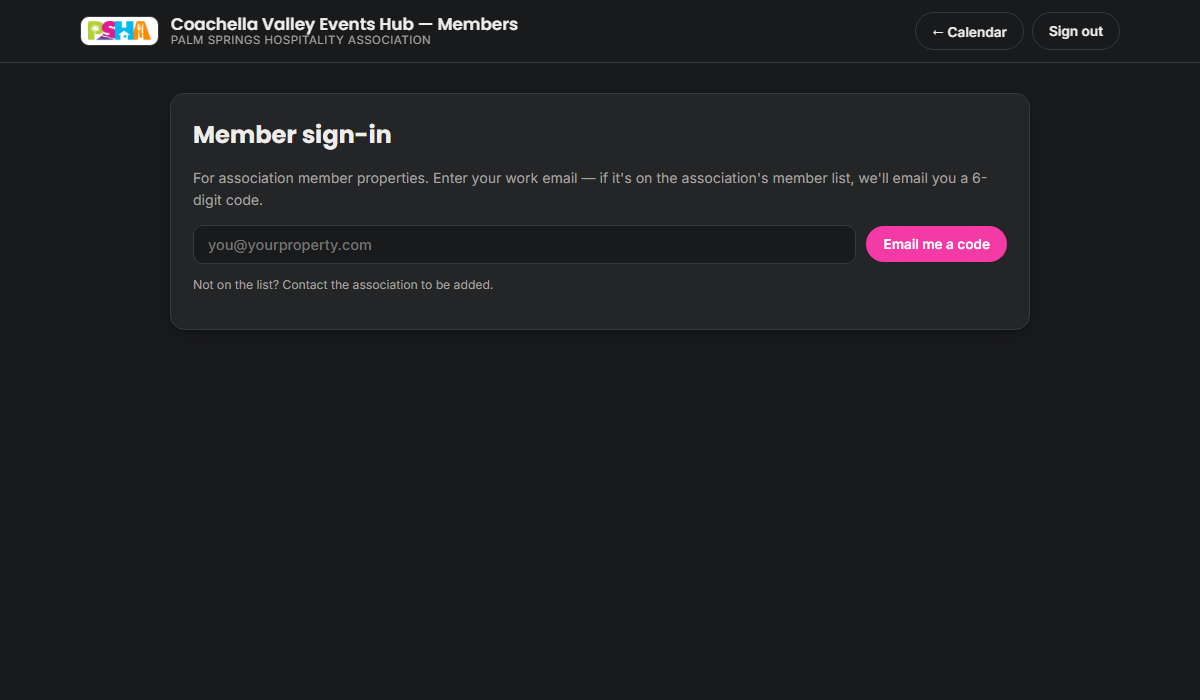
Enter your work email → a **6-digit code** is emailed → enter it. No passwords, no accounts; sessions last 30 days. Not on the list? Ask the association to add you.
### 3.2 🌴 Planning Concierge (the default tab)
A members-only AI planning colleague. It knows the full public calendar, the member layer *you're allowed to see*, the PSHA member directory with contacts, and checks the live web. Ask it anything: date conflict checks (it rates dates **FAVORABLE / WATCH / HIGH PRESSURE / CRITICAL**), demand outlooks, venue and vendor recommendations (fellow PSHA members first), event ideas, or full RFP drafts written from *your property's* perspective. Starter chips get you going; every answer ends with follow-up suggestions.
### 3.3 My events
Your property's entries, each with edit/remove, plus:
- **Three visibility levels** for every entry:
- **Private** — only your property sees it (your own planning).
- **Members — full details** — fellow members see everything.
- **Members — hold only** — members see just your property, the dates, and an optional label ("Buyout"). Deconfliction without disclosure.
- **Live conflict warnings** while you pick dates — "⚠ Same dates as: …" — informational, never blocking.
- **→ Public** on any full-detail entry submits it for the *public* calendar; the association reviews before anything appears publicly. Your private entry stays either way.
- **Log outcome** appears on past events: record whether it drove business (📈 big lift → ↘ slow period) with an optional note. Association-only data that sharpens future demand estimates.
### 3.4 Batch import from a spreadsheet
Drop in **any CSV or Excel file** — arbitrary column names and date formats. The AI maps the columns, flags rows you've imported before as duplicates, and shows a tick-list preview. Choose the visibility for the batch and import.
### 3.5 Auto-sync a calendar feed
Already keep events in Google Calendar, Outlook, or a booking system? Paste its **iCal/ICS feed URL** once, choose a visibility, save. Every night the Hub mirrors the feed into your entries — adding, updating, and removing to match — and shows the last sync result. Clear the URL to stop.
### 3.6 🎨 Creative Studio
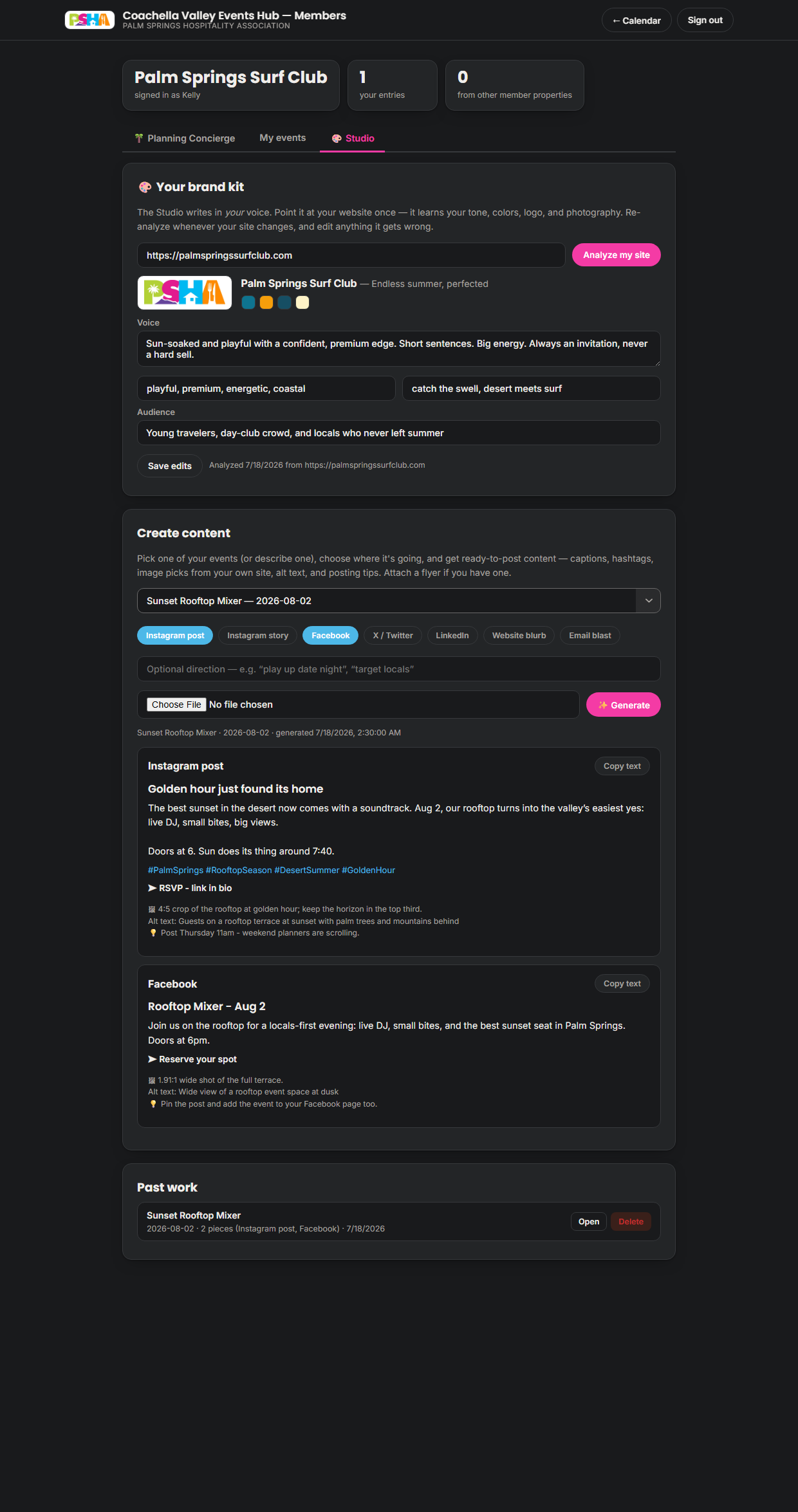
Marketing content in your own voice, three cards:
1. **Your brand kit.** Enter your website URL → **Analyze my site** (~20 s). The Studio harvests your real logo, photography, and colors, and distills your voice, tone words, key phrases, and audience. Review the kit, edit anything that's off, save. Re-analyze whenever your site changes.
2. **Create content.** Pick one of your events (or describe one), toggle platform chips — Instagram post, Instagram story, Facebook, X, LinkedIn, website blurb, email blast — add optional direction ("play up date night"), optionally attach a flyer, **✨ Generate**. Each platform card arrives ready to post: caption in your voice, hashtags, a CTA, an image pick *from your own site* with crop guidance, alt text, and a posting tip — with a copy button.
3. **Past work.** Every generation is saved. Reopen, reuse, or delete.
---
## 4 · Public experience
### 4.1 Browsing
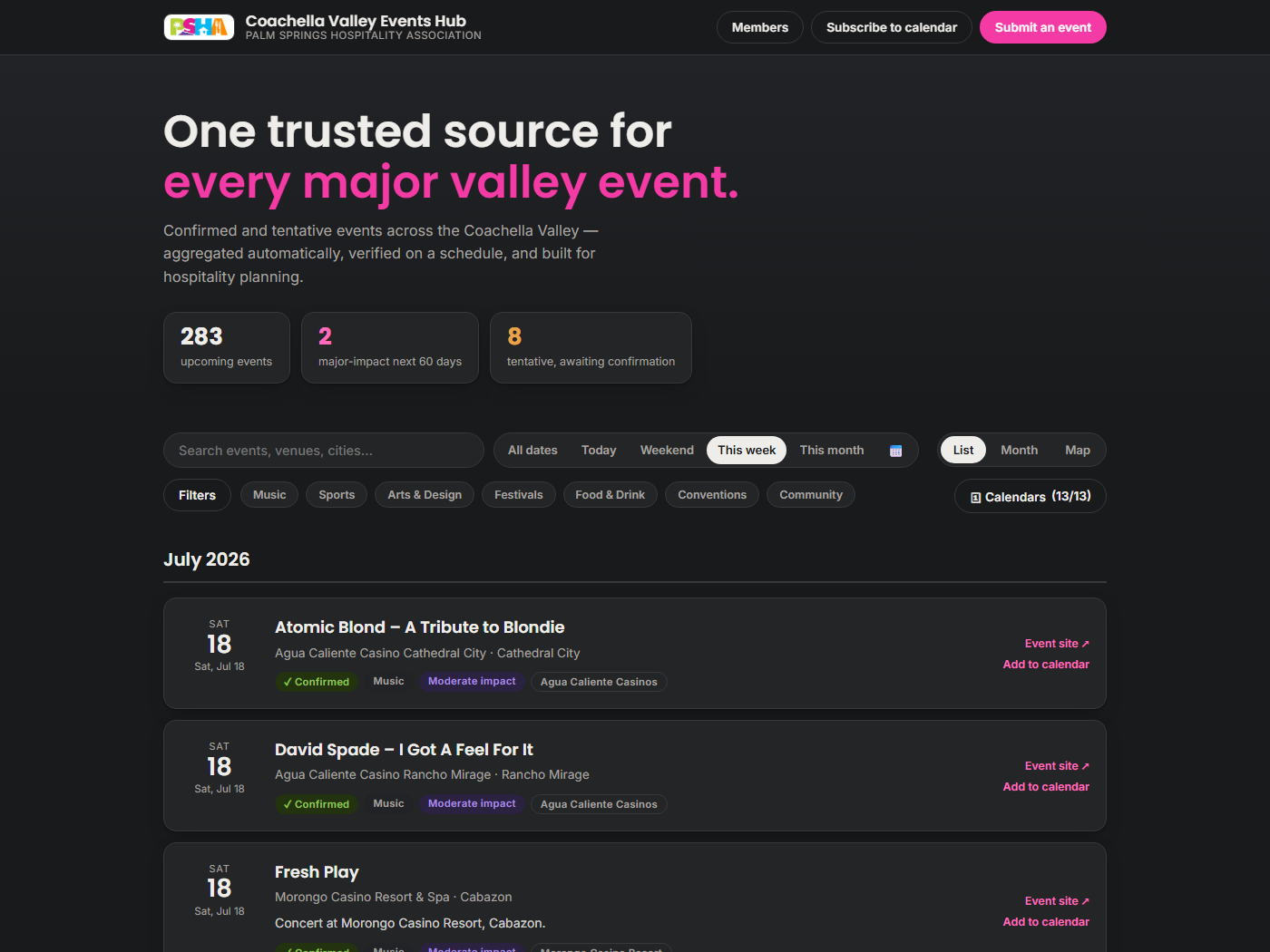
- **Three views**: **List** (cards grouped by month), **Month** (grid — each future day tinted by expected **visitor pressure**, light → critical, with a legend), and **Map** (dots colored by category, sized by visitor impact; a location with several events cycles through them "1 of N").
- **Date pills** — All dates / Today / Weekend / **This week** (the default) / This month / custom range.
- **Search and filters** — free text; status (confirmed/tentative), visitor impact, city, category chips; and the **🗓 Calendars** picker, where viewers choose which source feeds they trust (ranked by authority).
- **Tentative events** are visually distinct (amber, dashed) with their confirm-by deadline printed — you always know what's solid.
### 4.2 Take the calendar with you
- **Subscribe to calendar** — one click adds a live feed to Google/Outlook/Apple Calendar: the full feed or **major events only**. Updates flow automatically forever.
- **📬 Monday digest** — email signup in the footer: major events in the next 60 days, one-click unsubscribe.
- **Install as an app** — on a phone, the browser offers "Add to Home Screen"; the Hub then opens like a native app.
- **Embed it** — any website can drop in the widget with one line:
``
(parameters: `days`, `limit`, `city`, `impact`, `title`)

### 4.3 Submitting an event

`/submit.html` needs no account of any kind — the only requirement is an email address (used for confirmation reminders). **Have a flyer?** Photograph or upload it and the AI fills in the form; just check it over. Submissions are reviewed by the association before appearing on the calendar; if listed as tentative, the submitter receives automatic reminder emails with one-click confirm / extend / withdraw links before the deadline.
---
## 5 · Claude connector (MCP)
The entire platform is operable by Claude — claude.ai chat, Claude Desktop, **Claude Cowork**, and Claude Code — through one custom connector.
**Setup** (once): Settings → Connectors → *Add custom connector* → name it (e.g. *Events Hub*) and paste the connector URL:
```
https://veh-api.peterlof.workers.dev/mcp/
```
The `` is issued by the platform owner. **The full URL is the admin credential** — share it only with admins, through a private channel. To revoke or rotate: `wrangler secret put MCP_SECRET` (in `worker/`); the old URL dies instantly. No separate authentication step is needed. In Claude Code: `claude mcp add --transport http events-hub ""`.
**Then just talk.** Examples that work verbatim in Cowork:
> *"What's in the approval queue?" · "Approve the wine walk as tentative." · "Disable the surf club calendar." · "Add Jane at the Kimpton to the roster." · "Make a Reels video of this weekend's biggest events — energetic, use only the new key art." · "Turn off the member chatbot and change the video model to the newest Veo."*
**The 24 tools**, grouped:
| Area | Tools |
|---|---|
| Overview | `hub_stats` |
| Events | `list_events` · `get_event` · `create_event` · `update_event` · `approve_event` · `archive_event` |
| Sources | `list_sources` · `set_source_enabled` · `add_calendar_source` |
| Video Studio | `create_promo_video` · `list_promo_videos` · `list_assets` |
| Members | `list_members` · `add_member` · `remove_member` · `set_member_admin` · `invite_member` · `list_member_events` |
| Governance | `get_policies` · `update_policies` · `get_ai_settings` · `update_ai_settings` |
**Safeguards**: Claude is instructed to confirm with you before destructive actions (archiving events, removing members); member data is flagged confidential; model changes are validated (chat model can never be older than `gemini-3.5-flash`); and every write lands in the audit history as an `MCP:`-prefixed commit.
---
## 6 · Operations summary
Full detail lives in **[OPERATIONS.md](../OPERATIONS.md)** — accounts, keys, deployment, troubleshooting. The essentials:
- **Accounts** (one-afternoon handoff): GitHub (hosts everything; the one subscription, $4/mo for the private repo), Google AI Studio key (all AI), Resend (email, free tier), Cloudflare (the Worker, free tier), plus two GitHub tokens and a session secret per the runbook.
- **Costs**: ≈ **$4–8/month** typical. The two usage meters: Concierge questions (~2¢ each) and Video Studio renders (~$1–2 each, mostly the Veo intro). No per-seat fees anywhere; AI spend is visible in the Google AI Studio dashboard. Delete old rendered videos from the admin gallery occasionally to keep the repository lean.
- **Weekly routine** (~15 min): admin panel → Needs attention → work the list. Everything else is automated.
- **As needed**: add members (Members tab), add calendars (paste a URL), adjust behavior (Policies), tune AI (AI tab), make videos (Video tab) — no developer required for any of it.
- **If something breaks**: the troubleshooting table in OPERATIONS.md covers stale events, stopped emails, sign-in issues, and AI outages — almost everything is fixed by re-issuing a key or re-running a workflow, and the nightly pipeline self-heals around individual source failures.
- **Security model**: the repo stays **private** (roster, member events, subscriber emails); member data lives on a branch the website never serves, with privacy enforced server-side; all credentials issued at handoff should be freshly rotated.
---
*Built at the PS/NExT Summit Vibe-a-thon, 2026, for the Palm Springs Hospitality Association.*